Post Status Notifications
Context
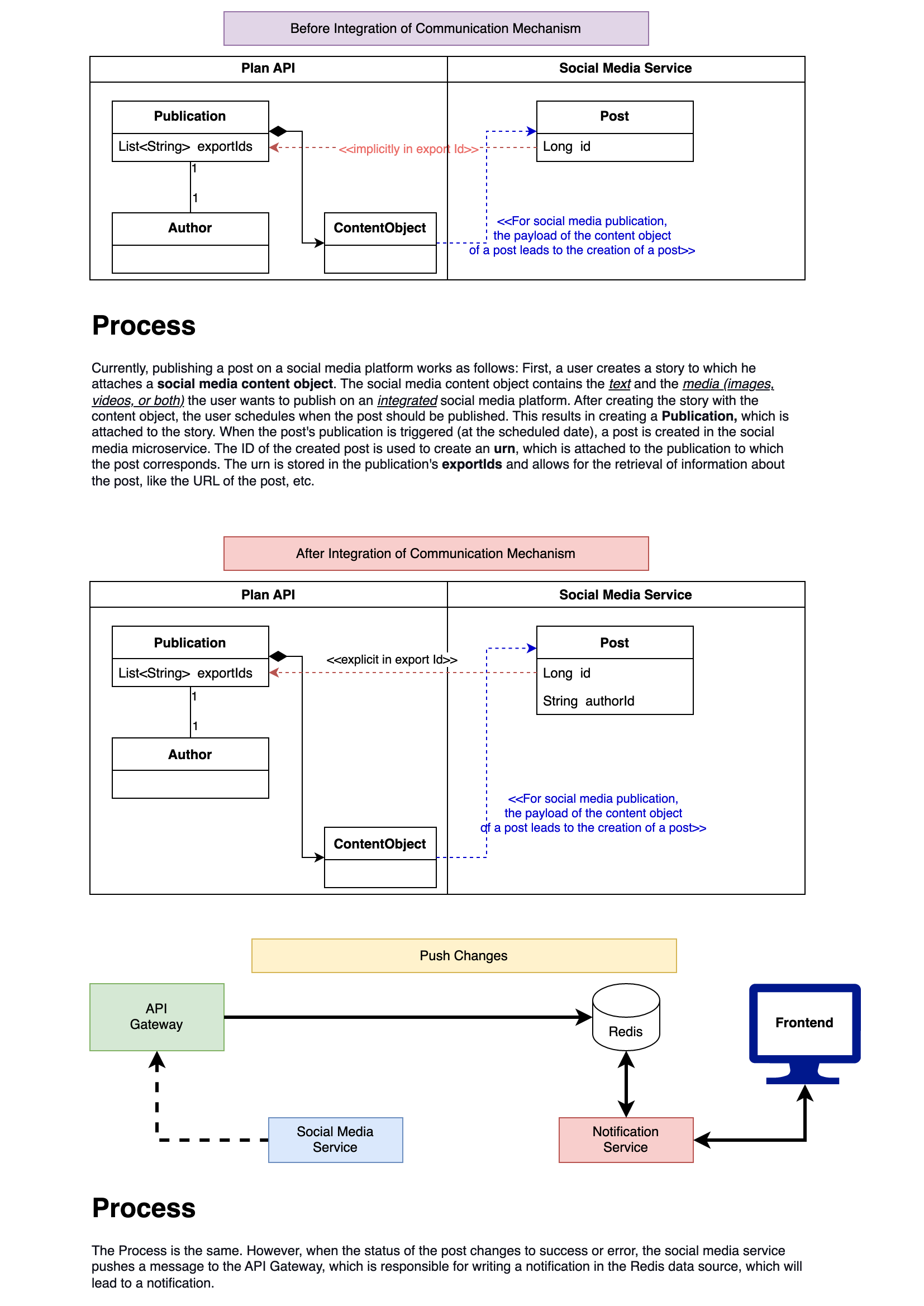
Before asynchronous publication was introduced, the author of a post could immediately know whether their post was successful. However, for posts with very long videos the upload process can take several minutes, freezing the browser and causing a poor user experience. To improve this, posts are published to a provider asynchronously using a queue: each time a user publishes a post they immediately get a response containing the post's ID, created in a pending state. The Social Media Service pushes the pending post to a queue for further processing. Once the post is published on the provider, its state changes to success; if an error occurs, the state changes to error and the exact description of the error is stored.
While this prevents the user from waiting a long time, it removes the immediate feedback that previously existed. To know if a post was successful, a user has to query the Social Media Service. Moreover, since scheduling is supported, a user may expect a post to be present on a provider by a specific date while an error occurred during publication without them being notified. A notification mechanism between the Social Media Service and the frontend is therefore needed.
Solution
Three questions had to be answered.
1. Who should we notify?
This is the most challenging question, because notifying only the person making the post is not sufficient. If the post is scheduled, the author may be on holiday when it is published. More than just the author must be notified to allow the organization (Newsmind customer) to act on the post status change — potentially a recipient list of all persons responsible for social media publication for a given customer. For simplicity, the remainder of this section assumes only the post's author is notified.
2. What are the communication possibilities with the notification service?
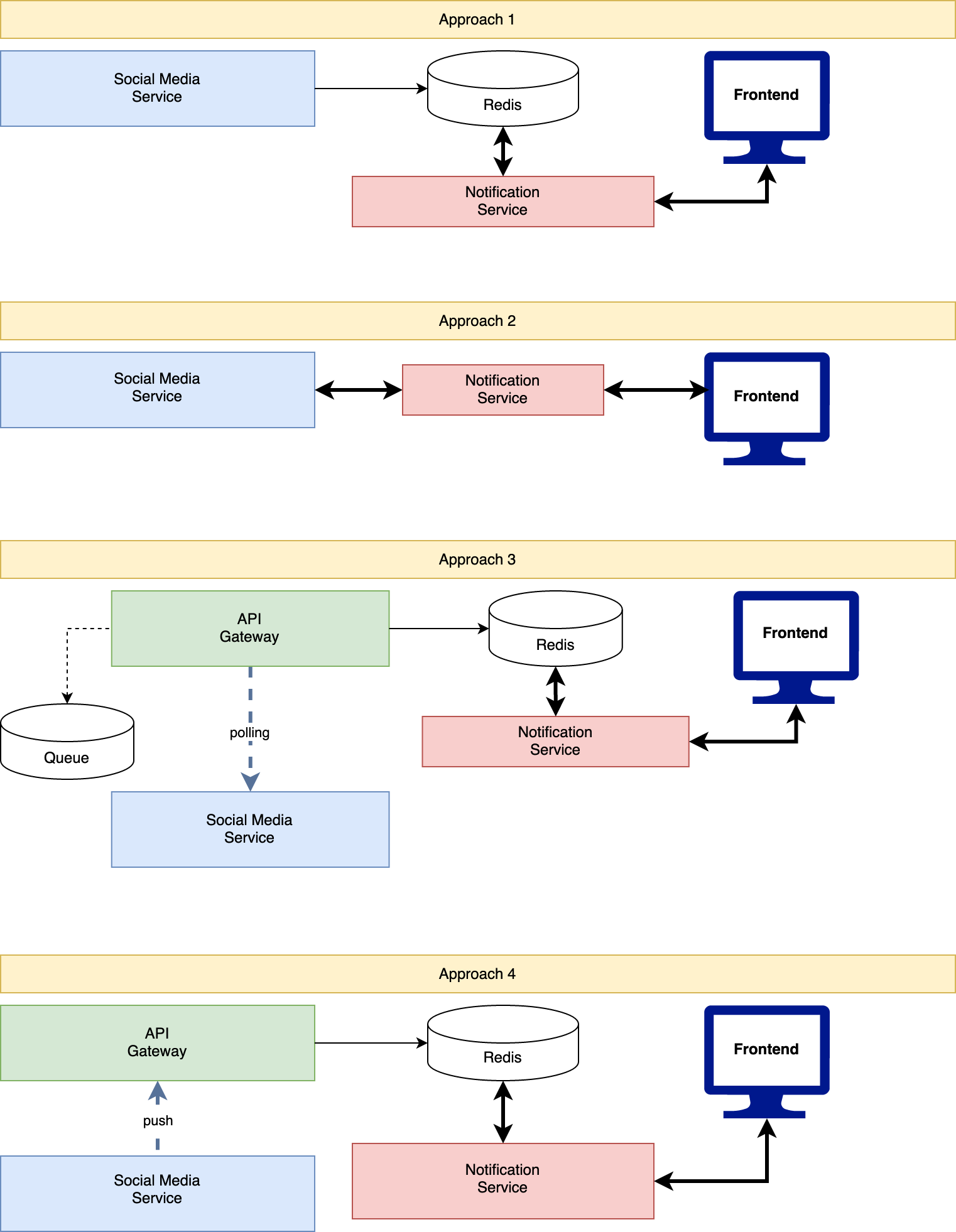
Approach 1 — Social Media Service → Redis
The Social Media Service writes a message into the Redis instance used for notifications each time a post's status changes. The Notification Service consumes the message and creates a notification for the user who triggered the post.
- Pros: easy to implement and consistent with the current convention for communicating with the Notification Service.
- Cons: adds a new dependency to the Social Media Service; changes to Redis affect the Social Media Service; potential integrity issues, since the Notification Service needs user information and the Social Media Service becomes aware that user information can change.
Approach 2 — Social Media Service → Notification Service
The Social Media Service sends a message directly to the Notification Service each time a post's status changes.
- Pros: easy to implement (one new endpoint in the Notification Service); changes to Redis do not affect the Notification Service.
- Cons: adds a new dependency to the Social Media Service; potential integrity issues around user information.
Approach 3 — API Gateway polling
The Social Media Service is not connected to any other service. The API Gateway pushes a post ID to a queue each time a post is created, then picks an ID from the queue and uses it to pull post information from the Social Media Service. When there is a status change, the API Gateway pushes a message to the Redis store, which the Notification Service consumes.
- Pros: no new dependency at the Social Media Service level; no leak of user information to other services.
- Cons: very complex to implement.
Approach 4 — Social Media Service → API Gateway
The Social Media Service pushes a message to the API Gateway each time a post's status changes, and the API Gateway is responsible for creating the notification for the right users.
- Pros: easy to implement; changes to Redis do not affect the Notification Service; no integrity risks since the API Gateway does not leak user information.
- Cons: adds a new dependency to the Social Media Service.
3. What should the notification message contain?
The main goal is to communicate the status of a post:
// Successful post
{
  "status": "SUCCESS",
  "postUrl": "https://{provider}.com/post_id",
  "postId": 123 // used to attach a story to a notification
}

// Failed post
{
  "status": "ERROR",
  "description": "{ the exact description of the error }",
  "postId": 123 // used to attach a story to a notification
}
Chosen approach
Approach 4 was implemented, since it provides the best trade-off between complexity and advantages. The implementation is tracked in NSTORIES-1996.